How to Access Google and Social Media in China: VPN Guide for Foreign Travelers 2026
You land at a Chinese airport, switch off airplane mode, and open Gmail to check a confirmation email. The page does not load. Instagram is stuck on loading. Google Maps shows nothing. This is the moment every unprepared traveler faces when they arrive in China.

The Direct Answer
You cannot reliably access Google, Gmail, Instagram, Facebook, LinkedIn, or Zoom in China without a VPN pre-installed on your devices before arrival. The Great Firewall blocks these services at the network level. Download a reputable VPN app, create your account, and test the connection while you are still outside China.

A VPN encrypts your traffic and routes it through a server outside China. To the firewall, your connection looks like ordinary encrypted HTTPS traffic, not a request to a blocked service. The critical rule: install and test the VPN before arriving, because VPN provider websites and app downloads are also blocked inside China.
Why These Services Are Blocked
China operates a nationwide internet filtering system commonly called the Great Firewall. It uses DNS poisoning, IP blacklisting, and deep packet inspection to block thousands of foreign services, including:
- Google (Search, Gmail, Drive, Calendar, Maps, Photos)
- Instagram, Facebook, Twitter/X
- YouTube
- Zoom, Microsoft Teams
- WhatsApp, Telegram
Not all foreign traffic is blocked. Services that comply with local regulations, such as Apple iCloud (China region), remain accessible. A properly configured VPN can bypass the firewall by making your traffic look like ordinary encrypted data to a permitted destination.

How to Choose and Install a VPN Before Arriving
Step 1: Choose a VPN Provider
Not all VPNs work reliably in China. The most commonly used options among travelers include:
- Astrill VPN — Historically the most reliable choice for China. Offers obfuscation protocols (OpenVPN over SSL, Stealth VPN) specifically designed to evade deep packet inspection.
- ExpressVPN — Uses the Lightway protocol. Some users reported outages in 2024 and 2025. Check recent reviews before your trip.
- Mullvad VPN — Less well-known but works for basic browsing with strong privacy protection.
VPN reliability in China changes frequently. Checking recent discussions on r/travelchina or r/Chinavisa before your trip is the best way to confirm what currently works.
Step 2: Install and Create an Account
Download the VPN app from its official website or your device app store while you are outside China. Create your account and choose a subscription plan. One to three months is usually enough for a single trip.
Step 3: Enable Obfuscation
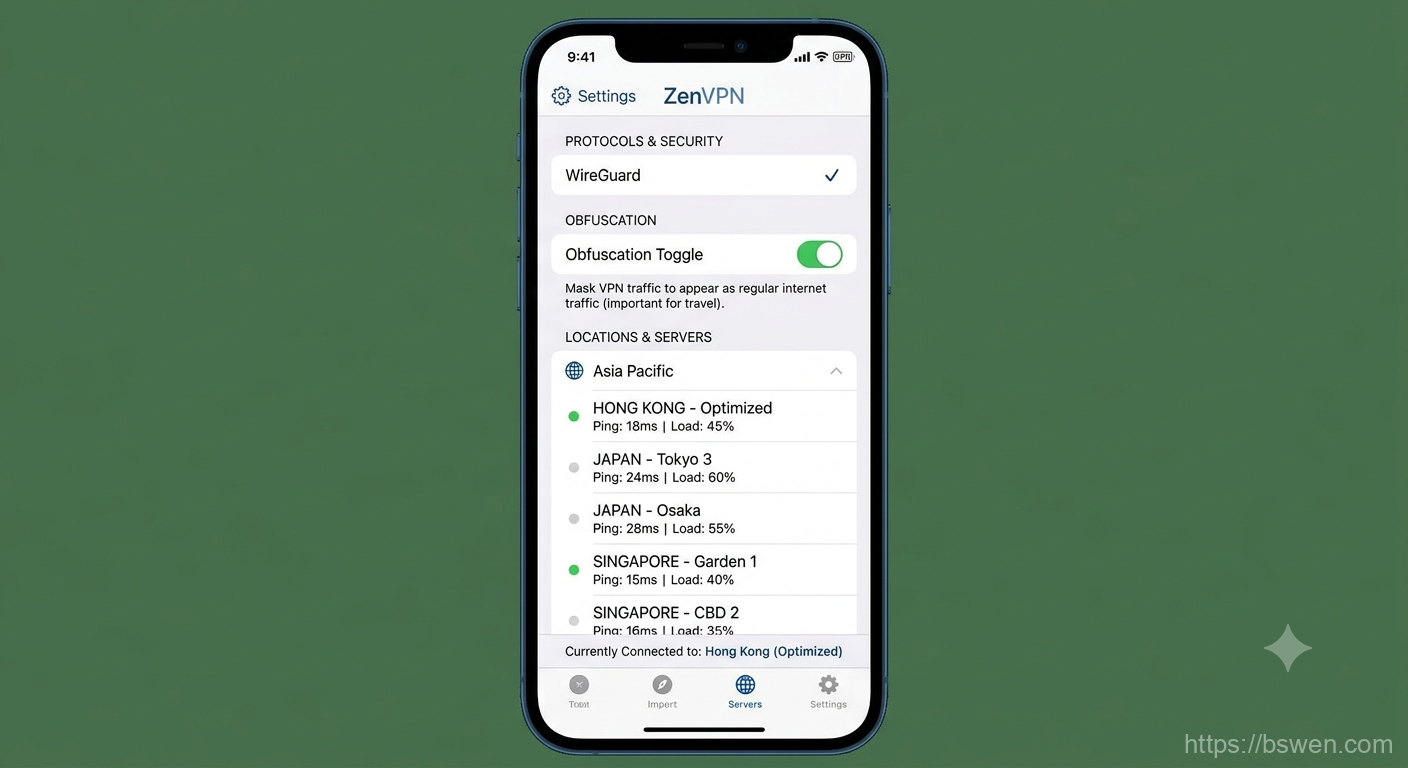
Open the VPN app settings and enable obfuscation. Look for options labeled Stealth, Obfuscated, or Cloak. These protocols make your VPN traffic resemble regular HTTPS traffic, helping it pass through deep packet inspection. Select a server in Hong Kong, Japan, or Singapore for the lowest latency to mainland China.
Step 4: Test Before You Travel
Connect to the VPN, then try loading Google, Gmail, and Instagram. Verify that blocked services actually load while you are still on your home network. This is your only opportunity to troubleshoot before entering China.
What to Do If You Arrive Without a VPN
If you arrive without a working VPN, you have limited fallback options:
- Hotel VPN router — Many international hotels in Beijing, Shanghai, and Guangzhou provide VPN routers. Ask at the front desk.
- Remote assistance — Ask a friend or colleague outside China to email you a VPN configuration file or a download link.
- Cloud proxy — If you have access to Alibaba Cloud or Tencent Cloud, you can set up a temporary proxy server. This requires technical knowledge.
These workarounds are less reliable than installing a VPN before departure.

Which Apps Work Without a VPN
These apps function on Chinese networks without a VPN:
- WeChat (messaging, payments, mini-programs)
- Alipay (payments, DiDi rides, train tickets)
- DiDi (ride-hailing)
- Baidu Maps (navigation)
- Taobao, JD.com (online shopping)
- Meituan (food delivery)
- Weibo (social media)
You can manage daily life without a VPN for basic needs. But for Gmail, Google services, social media, or video calls, a VPN is essential.
Common Mistakes
- Assuming any VPN works in China — Many popular VPNs are blocked. Research China-specific options.
- Not testing before departure — Installation alone is not enough. Verify blocked sites load while you can still troubleshoot.
- Forgetting Google Authenticator — Export your 2FA secrets before traveling. You cannot access the app without a VPN.
- Relying on a single VPN — Install at least two providers. If one gets blocked mid-trip, you have a backup.
- Confusing an eSIM with a VPN — An eSIM gives you mobile data on Chinese networks. It does not bypass the firewall. You need both.
Summary Checklist
Before you leave for China:
- Choose and subscribe to a China-compatible VPN (Astrill, ExpressVPN, or Mullvad)
- Install the VPN app on all devices (phone, laptop, tablet)
- Enable obfuscation in the VPN settings
- Select a server in Hong Kong, Japan, or Singapore
- Test that Google, Gmail, and Instagram load through the VPN
- Install at least one backup VPN
- Export Google Authenticator secrets
- Download WeChat, Alipay, and DiDi before departure
- Check recent VPN reviews on traveler forums
Final words
More reading and next steps
That is the main thread of the article. Keep the links below handy, and use the related posts to continue exploring the same topic from a different angle.
Comments