How to Access the Internet in China as a Foreigner — VPN, Apps and What Actually Works in 2026
Can Foreigners Use the Internet Normally in China?
No — not without preparation. The Great Firewall of China blocks Google services, WhatsApp, Instagram, Facebook, X (Twitter), and many foreign news sites once you connect to a Chinese network. Install a reliable VPN before you arrive, not after. Book a travel eSIM or buy a Chinese SIM card at the airport for mobile data. Without a VPN, your usual apps and websites will not work. The good news is that with a little advance planning, staying connected is entirely manageable.

Why Internet Access Is the Biggest Surprise for First-Time Visitors
Most travelers assume their international roaming plan will work as usual. It does — technically. Your phone connects to a local tower and you get data. But the Great Firewall still blocks apps and websites even over that roaming connection. Google Maps shows no directions. WhatsApp messages queue without sending. Instagram feeds just spin.
The disruption hits hardest in the first few hours after arrival, when you need navigation to reach your hotel, messaging to coordinate with travel companions, and search to find nearby restaurants. Without a VPN and the right apps, you are effectively offline.
Before You Leave: What to Do at Home
Choose a VPN
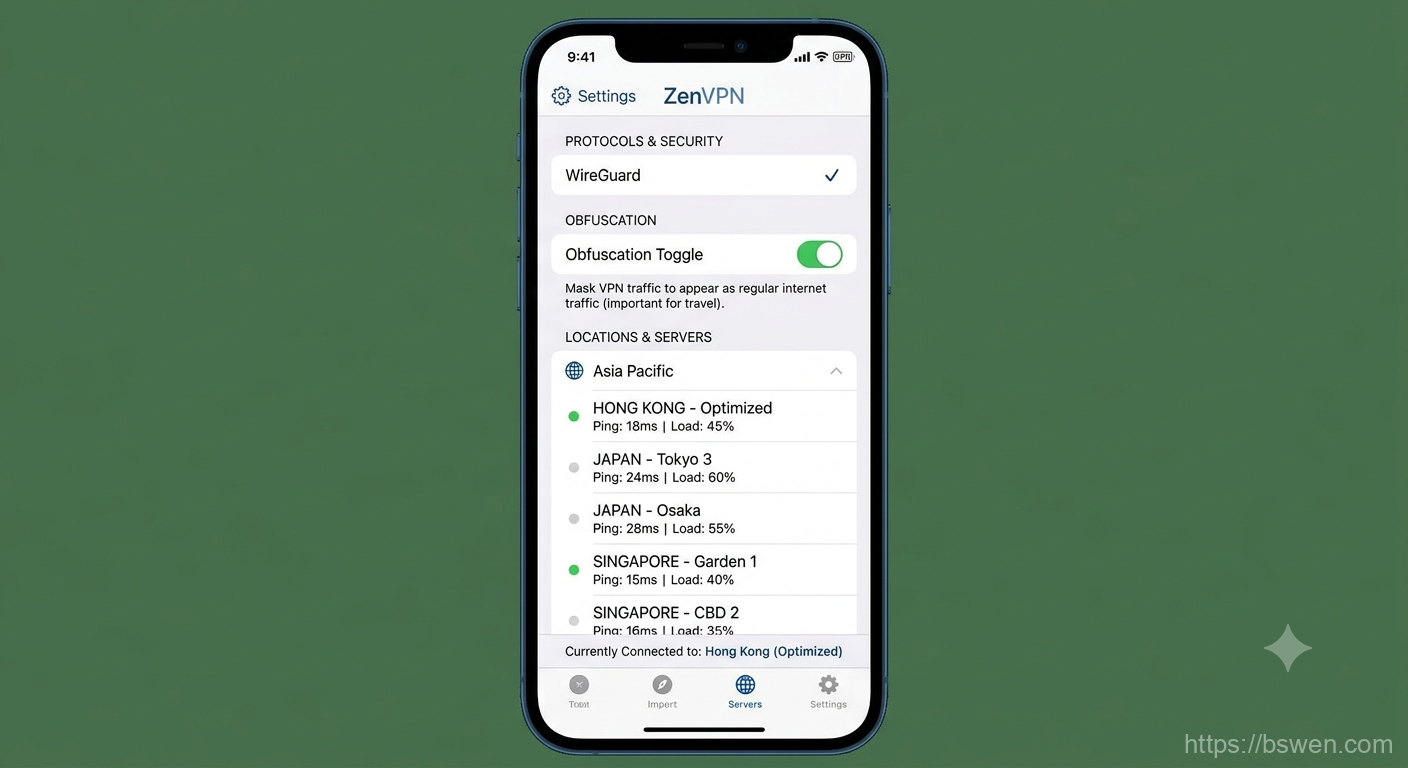
Not all VPNs work in China. The firewall actively detects and blocks VPN connections, and the situation changes over time. When choosing a VPN, look for:
- Obfuscation support: This hides the fact that you are using a VPN. Without it, the firewall can identify and block the connection.
- WireGuard protocol: Currently more difficult to block than older protocols like OpenVPN.
- Asia-optimized servers: Servers in Hong Kong, Japan, Singapore, or Taiwan typically provide the best speeds from within China.
- App-based kill switch: If the VPN drops, the kill switch blocks all internet traffic so you do not accidentally send data through the unprotected connection.
Install the VPN app on your phone and laptop before departure. The app stores inside China may not have the VPN apps you need. Test the VPN while you are still at home to confirm it works.
Download Essential Apps
These apps work without a VPN inside China and should be installed before arrival:
- WeChat: The essential messaging, payment, and mini-app platform used by everyone in China.
- Alipay: Mobile payment and mini-app platform. Also functions as a super-app for many services.
- Apple Maps: Google Maps does not work in China. Apple Maps uses local map data and provides turn-by-turn navigation.
- Didi: The ride-hailing app for China. You can request a taxi or private car through it.
- Amap: Local alternative to Google Maps with public transit directions and real-time traffic. The interface is mostly Chinese but navigation works well.

Set Up Mobile Data
You have three options for mobile data in China:
- Travel eSIM: Purchase before your trip from providers like Airalo or Holafly. You receive a QR code to install the eSIM. Activate it when you arrive. This is the most convenient option.
- International roaming: Check with your home carrier. Some plans include China. Expect to pay around 30-60 RMB per day for data. The Great Firewall still applies.
- Chinese SIM card: Buy at the airport arrival hall from China Mobile or China Unicom counters. You need your passport. A 30-day plan with 10-20 GB of data usually costs around 100-200 RMB. The counter staff can help with setup.
After You Arrive: Getting Online
Connect to Wi-Fi
Most hotels, airports, and cafes offer free Wi-Fi. The connection process varies:
- International hotel chains: Usually provide Wi-Fi access with your room number and last name. No SMS verification needed.
- Airport Wi-Fi: Often requires entering your phone number to receive an SMS verification code. If you do not have a Chinese number yet, some airports let you scan your passport at a kiosk to get a Wi-Fi voucher.
- Local hotels: May require a Chinese phone number for SMS verification. If you cannot receive SMS, ask the front desk for help.
Activate Your VPN
Once connected to any network, launch your VPN app. Check that it is actually working by loading a blocked site like google.com. The VPN app’s own “connected” status is not always reliable — the connection may appear active while traffic is still being filtered. Always verify with a real request.

Apps That Work Without a VPN
These apps function normally inside China with no special setup:
| Category | Works | Does Not Work |
|---|---|---|
| Maps | Apple Maps, Amap, Baidu Maps | Google Maps |
| Messaging | WhatsApp, Facebook Messenger, Signal | |
| Social | Weibo, Douyin (TikTok China) | Instagram, Facebook, X (Twitter) |
| Search | Baidu | Google Search |
| Video | Youku, Tencent Video, Bilibili | YouTube |
| News | Chinese news apps | BBC, CNN, New York Times |
Several apps in the “Works” column are Chinese-only but essential for daily life. WeChat, Didi, Amap, and Alipay are especially useful and worth setting up before your trip.
Common Mistakes
Installing the VPN after arrival. The app stores accessible inside China may not show the VPN apps you need or may block them entirely. Install everything before departure.
Relying on free VPNs. Free VPN services are almost all blocked in China or have poor performance. Invest in a reputable paid VPN.
Forgetting that Google Maps does not work. This is the most frequently reported frustration. Download Apple Maps or Amap before you go. Test them at home even if you normally use Google Maps.
Assuming international roaming bypasses the firewall. It does not. Even with a roaming connection from your home carrier, the Great Firewall still filters traffic when your phone connects to a Chinese cellular tower.

Summary
Install a paid VPN with obfuscation support before you leave home. Download essential apps (WeChat, Alipay, Apple Maps, Didi) while you still have unrestricted internet access. Set up a travel eSIM or buy a Chinese SIM at the airport. Connect to Wi-Fi first, activate your VPN, then verify it is working by loading a blocked page. With these steps done before or immediately after arrival, you can use the internet in China without disruption for the rest of your trip.
Final words
More reading and next steps
That is the main thread of the article. Keep the links below handy, and use the related posts to continue exploring the same topic from a different angle.
References and links
- TravelChinaGuide Essential Tips General China travel tips covering practical preparation before departure.
- VPN Mentor China Guide Independent VPN comparison and testing results for China, updated regularly based on traveler reports.
- That One Privacy Site Independent VPN comparison and auditing resource with detailed protocol and logging policy analysis.
Comments