Why Chinese Apps Have So Many Ads and How to Survive Them as a Foreigner
The Ad Wall
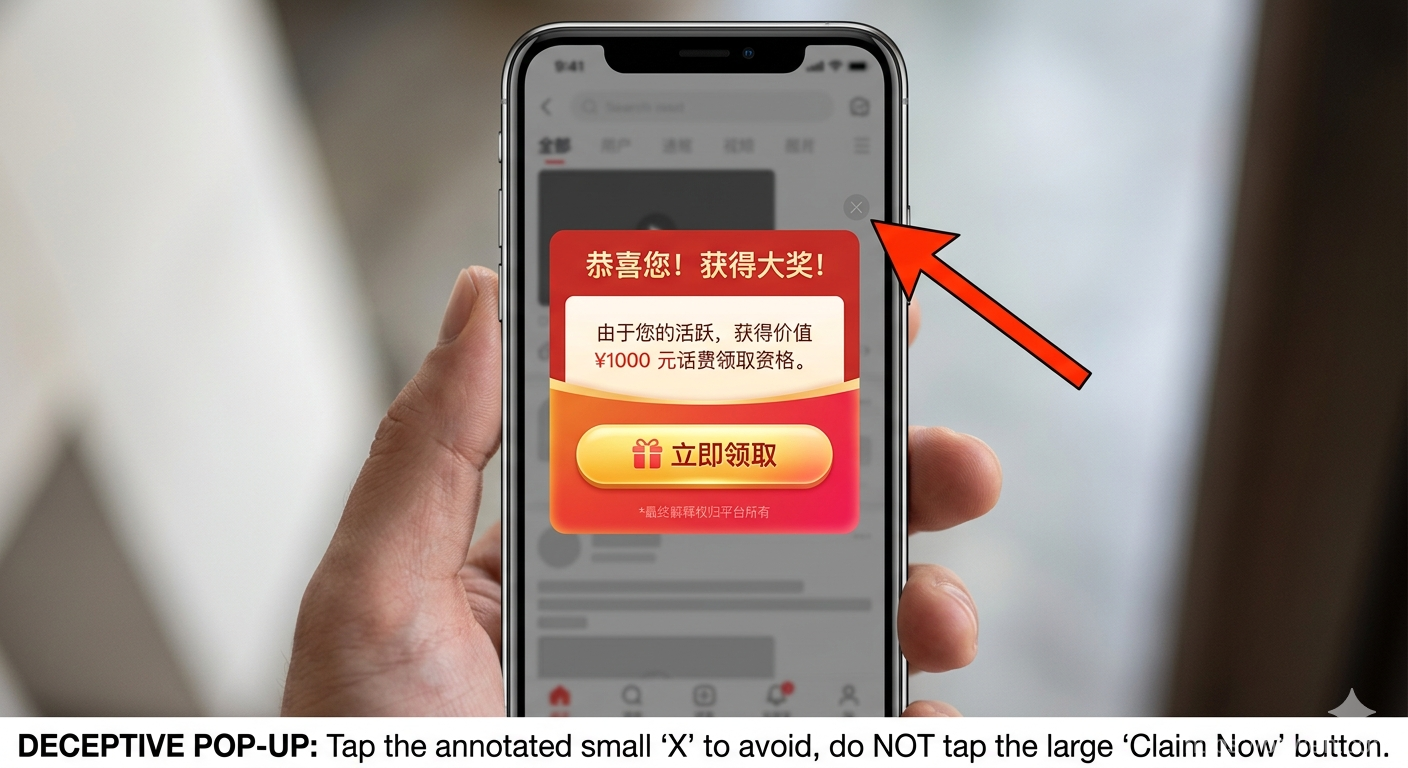
The first time you download a Chinese app, you will see a splash ad. You wait for the countdown and tap “Skip”. A pop-up appears offering a free prize. You tap the small “x” — but it opens a browser instead. You close everything and reopen the app. The same cycle starts again.
This is not an accident. This is how Chinese free apps work.
The Direct Answer
Chinese apps layer multiple ad formats — splash ads, interstitial pop-ups, banner ads, and redirect bait — because their business model depends on ad revenue even from paying users. The real close button is usually small, gray, and deliberately hard to find. The only reliable strategies are:
- Install international alternatives whenever possible
- Learn to spot the real close button (look for tiny gray or transparent text in a corner)
- Never tap anything that looks like a prize, gift, or discount
- Accept that a paid membership will usually reduce but not remove ads
Why Chinese Apps Depend on Ads
Most popular Chinese apps operate on a freemium model where the free tier is subsidized by aggressive advertising. Unlike many Western apps where a subscription removes all ads, Chinese apps often treat ads as a permanent revenue stream. Even after you pay for membership, the app may simply switch from third-party ads to “personalized” first-party promotions.
This difference comes from a market where users are accustomed to free services with ads, and where the cost of user acquisition is recovered through continuous ad exposure rather than upfront payments.

The apps shown above are essential for daily life in China. Each one has its own ad behavior, and knowing what to expect helps reduce frustration.
How to Survive the Ad Maze
Step 1: Identify the Real Close Button
The close button is almost never where you expect it. Look for:
- A tiny gray “x” or “skip” text in the upper-right corner
- A countdown timer — wait for it to finish, then a close option appears
- Semi-transparent text blended into a colorful banner
Step 2: Never Tap Prize or Gift Buttons
Any button that says “Free Gift”, “You Won”, “Red Packet”, or “Discount” is a redirect trap. Tapping it opens a browser tab to a shopping page or game that is difficult to exit. The safest tap is always the small gray text, never the colorful button.
Step 3: Use International Versions
Some common Chinese apps have international versions with a leaner interface:
- Alipay — AlipayHK has a cleaner design with fewer ads
- Didi — Uber works in some Chinese cities as an alternative
- Meituan — the browser version is less aggressive than the app
- WeChat — has no real alternative, but staying within chat screens avoids most ads
Step 4: Install a Screen Translator
Many Chinese app interfaces have no English option. Install a screen translation tool like Microsoft Translator or Google Translate (with VPN) that can overlay translations on your screen. This makes it much easier to find the close button even when all labels are in Chinese.
A Real Traveler Scenario
An American visitor in Beijing needed to unlock a shared bike. He downloaded the bike-sharing app, waited through a five-second splash ad, and then a pop-up appeared: “Congratulations! You won a prize!” He tapped the small “x” — nothing happened. He tapped the colorful button by accident and got redirected to a shopping site. He closed the browser, reopened the app, and the same cycle repeated. It took him over ten minutes to finally unlock a bike.
This is a typical experience. The key insight is that it is not user error — it is a deliberate design pattern. Local Chinese users have developed an instinct for which buttons to ignore, but visitors have to learn it from scratch.
The reward for navigating the ad maze is being able to actually use the service.
Common Mistakes
- Reopening the app instead of closing it properly — when you hit a redirect, force-close the app from the task switcher instead of pressing the back button. The back button often reopens the same ad.

- Tapping buttons out of frustration — the more ads you see, the more you want to tap anything to make them go away. This is exactly what the design intends. Take a breath and look for the gray text.
- Assuming a paid membership removes all ads — always check what the membership actually covers. Many apps specify “ad-free” only for a specific feature, not the entire app.
- Using the wrong app store — Chinese Android phones do not include Google Play. Apps downloaded from third-party stores may have extra ad SDKs injected.
Related Knowledge
- To download Chinese apps on iPhone, you need a Chinese Apple ID. Set one up before your trip.
- On Android, download apps from Huawei AppGallery, Xiaomi GetApps, or the app’s official website.
- Chinese WiFi often requires SMS verification for registration. If your foreign number cannot receive SMS, buy a Chinese SIM card at the airport.
- A VPN helps with accessing blocked services but operates in a legal gray area. Set it up before arriving.
Summary
Chinese apps use aggressive ad patterns that surprise most foreign visitors. The solution is not to fight the design but to work around it: learn to spot the real close button, ignore prize bait, use international alternatives, and accept that ads are part of the ecosystem. Once you understand the pattern, the frustration drops significantly.
Final words
More reading and next steps
That is the main thread of the article. Keep the links below handy, and use the related posts to continue exploring the same topic from a different angle.
Comments